
You need a headshot that looks like you, fits your brand, and keeps you legally covered. We turned those priorities—echoed in Reddit threads, Trustpilot reviews, and past team launches—into a weighted scorecard for the best AI headshot generator tools.

How we tested and ranked the best AI headshot generators
Our nine-factor rubric:

Scores across these nine factors total 100 points, letting us crown category winners while still exposing where each service stumbles.
1. Magic Studio: best for preview-before-pay speed
Magic Studio earns 89.2/100 because you can judge the results before spending a cent.
Summary score — why it leads
Magic Studio earns 89.2/100 because you can judge the results before spending a cent. Upload about ten selfies, wait around 15 minutes, and scroll through 50 water-marked previews free of charge. Like what you see? Make a one-time payment, download instantly, and get back to LinkedIn during the same coffee break — Magic Studio corporate headshots.

Magic Studio AI headshot generator preview interface screenshot
Key specs
Price: $59 for 50 images across five preset looks
Resolution: 1,024 × 1,536 px (web-safe but not billboard-ready)
Turnaround: ~15 minutes for individuals; teams can generate up to 100 images per employee
Rights and privacy: Commercial use granted. Magic Studio states the personal model auto-deletes after 90 days; its broader policy mentions model improvement, so enterprise buyers should request written confirmation.
Refunds: No payment means no refund risk; after purchase you get one free redo but no cash-back unless consumer law requires it.
Why it works
Preview-before-pay removes the biggest gamble in AI headshots.
Fast delivery meets same-day press or interview deadlines.
Balanced lighting and skin-texture retention produced an above-average keeper rate in our tests.
Friction-free interface: upload → preview → pay → download. No hidden subscriptions.
Where it falls short
Resolution cap: 1K × 1.5K is fine for LinkedIn; print banners still need a 4K service such as BetterPic.
Brand control: Teams can apply a broad style but can’t lock exact background hex codes or add logo watermarks.
Privacy wording: Landing pages promise 90-day deletion, but the master policy references aggregated model training; ask for a unified statement.
No refunds after purchase: Skip the preview by mistake and you lose standard refund leverage.
Ideal fit
Solo founders, job seekers, and small teams that need a trustworthy headshot fast and prefer to see proof before pulling out the credit card.
2. BetterPic: best for 4K headshots and human edits
Summary score: why it shines
BetterPic scores 87.4/100 by delivering 4K resolution on every plan, a perk no rival matches at the entry tier. High-detail files survive press-kit crops and conference banners, and a built-in retouch request lets a human editor fix stray hairs or collar warps before you download.

BetterPic AI headshot generator homepage screenshot highlighting 4K and human edits
Key specs
Price and output: Basic $35 / 20 images, Pro $39 / 60 images, Expert $79 / 120 images
Resolution: 3,840 × 5,760 px (4K) on all tiers
Turnaround: ~2 h on Basic, ~90 min on Pro, ~1 h on Expert
Human edits: Flag issues; an editor retouches before final delivery.
Rights and privacy: Commercial license included. Uploads are not used for future model training and auto-delete after the job wraps.
Refunds: Seven-day money-back guarantee if the batch misses expectations.
Teams: Dashboard and volume pricing drop to $13 per person at scale.
Why it works
4K clarity lets designers crop aggressively without pixel loss.
Manual touch-ups turn near-misses into keepers, lowering your real cost per usable image.
Volume discounts and style-approval flows keep large teams on-brand.
Straightforward privacy language and a genuine refund window satisfy compliance checklists.
Where it falls short
Turnaround is slower than Magic Studio’s 15-minute preview; tight press deadlines may feel the lag.
The entry plan offers one style; upgrading to Pro unlocks wardrobe variety.
Human edits add a revision loop, so instant-gratification shoppers might get impatient.
Ideal fit
Pick BetterPic when print-quality resolution and post-generation polish matter more than sheer speed. The service suits speakers, PR teams, and anyone who cannot risk a blurry badge photo.
3. HeadshotPro: best for remote teams and compliance
Summary score: why enterprises trust it
HeadshotPro scores 86.8/100 by pairing solid image quality with the paperwork IT and legal teams need. You get a SOC 2 Type II report, SAML SSO, audit logs, and a ready-to-sign DPA, all before the first selfie uploads.

HeadshotPro AI headshot generator compliance and team dashboard screenshot
Key specs
Price and output: $29 / 30 images, $39 / 50 images, $59 / 70 images
Turnaround: Basic ~2 h; Executive ~15 min
Resolution: 4K (3,840 × 5,760 px) on the top solo tier and every team bundle
Security stack: SOC 2 Type II, SAML SSO, audit logs, signed DPA
Data retention: Uploads, outputs, and personal models auto-delete after 30 days
Credits: Never expire, so you can redeem them when the next hire starts.
Why it works
Lock a background once, and every new hire matches the same crop and hue, avoiding Photoshop cleanup.
Compliance features meet security questionnaires: external audit, single sign-on, and clear deletion windows.
Non-expiring credits let HR pre-buy at volume discounts without wasting seats.
Where it stumbles
Creative range is conservative; playful backdrops or fashion-mag poses are scarce.
Only the top individual tier guarantees 4K. Solo buyers on lower plans should confirm export size.
Ideal fit
Remote-first companies, professional-services firms, and any team that must clear an IT security review before using new software.
4. Aragon AI: best for deep editing and integrations
Summary score: where it excels
Aragon posts 86.1/100 by giving you a browser-based studio. Generate a base image, then swap jackets, backgrounds, lighting, or even facial expressions without rerunning the model.
Pricing starts at $35 for 40 images and tops out at $75 for 100, with faster queues at higher tiers. The Premium plan finishes in about 15–30 minutes.
Key specs
Editing scope: One-click outfit, background, pose, and expression changes.
Integrations: Zapier hooks, REST API, and brand-style presets push headshots into slide decks, email signatures, or CMSs.
Privacy: Blocks generalized model training on your likeness and lets you delete data on demand.
Team mode: Shared credits, locked backgrounds or logos, consistent new-hire images.
Resolution: High-res downloads on Premium (confirm pixel count if you need strict 300-dpi print).
Why it works
Turns near-misses into keepers; edit instead of regenerate.
API automates headshot placement across brand assets, saving design time.
Face-data clause reassures privacy-sensitive users.
Drawbacks
Premium features raise the price, so buyers wanting a single static photo may overpay.
Some outputs appear glossy; reduce polish if your brand prefers a conservative look.
Ideal fit
Founders, marketers, and creative teams who need multiple on-brand variations and want those versions to flow straight into their content pipeline.
5. Dreamwave: best for one-photo uploads and privacy clarity
Summary score: the single-selfie edge
Dreamwave scores 83.2/100 by trimming prep time. Upload one clear selfie, click Generate, and get a usable set without hunting for ten angles. For privacy-first buyers, the company states it “does not train future models on your likeness” and grants full commercial rights.
Pricing starts at $35 for 40 images and rises to $99 for 100, with delivery in about one hour for individuals.
Key specs
Input: 1 selfie (individual) or 5–8 photos for teams
Turnaround: ~60 min solo; teams slightly longer
Rights: “We do not own your likeness and do not train future models on it.”
Price range: $35–$99; verify live as promos shift
Resolution: Web-ready; contact support for exact pixels if you need 4K print files
Pros
Single-photo process saves time when your camera roll is sparse.
Clear policy simplifies vendor review documents.
Likeness holds up: testers with glasses and textured hair saw keeper rates close to multi-photo tools.
Cons
No published pixel count, so designers must confirm print suitability.
Refund terms vary by promotion; screenshot the policy before paying.
Smaller public-review footprint than rivals, so social proof is thinner.
Ideal fit
Privacy-conscious users and camera-shy founders who need a credible headshot fast with only one selfie to spare.
6. Secta Labs: best for huge batches and remix control
Summary score: why volume meets flexibility
Secta earns 78.2/100 by trading enterprise polish for pure creative runway. A one-time $49 plan delivers 300+ headshots in about an hour. When you need multiple looks for slide decks, investor bios, or social feeds, that volume spares you a fresh photo session.
The built-in Remix tool keeps the flood manageable: adjust background, lighting, or expression on any output without generating another hundred shots.
Key specs
Price: $49 flat for an extra-large batch (verify live)
Turnaround: ~1 h for most runs
Outputs: 300+ JPEGs across mixed styles
Remix: In-app edits for attire, backdrop, and mood; no rerun needed
Privacy: Site says no model training on your likeness; confirm deletion timeline before sensitive projects
Pros
High volume plus easy edits equals creative freedom; refine near-misses instead of restarting.
Remix saves compute credits and time, so one file can become three channel-ready versions in minutes.
Cons
Sorting 300 images takes work; most users publish only a handful.
Lacks SSO, audit logs, and other enterprise controls.
Resolution is not published; designers needing 4K should ask support or choose BetterPic or HeadshotPro.
Ideal fit
Consultants, creators, and founders who live on multiple platforms and enjoy fine-tuning visuals rather than chasing a single perfect shot.
Skim the grid for deal-breakers, then review the full write-ups for context. Prices and specs were verified September 15, 2026.
¹ USD, one-time purchase for individual plans unless noted.
² Vendor markets “high-resolution”; confirm pixel dimensions at checkout.
³ Adequate for web; contact support for print specs.
⁴ Ask support if 4K is required.
Still torn? Match your top risk or goal to the lines below and you’ll have a front-runner in under two minutes.
Choose Magic Studio if…
You want to see every image before paying; the 15-minute preview delivers a LinkedIn-ready shot by lunch.
Choose BetterPic if…
Your headshot must survive print, and 4K files plus human touch-ups keep conference banners sharp.
Choose HeadshotPro if…
A security checklist stands between you and launch; SOC 2, SSO, and audit logs tick the compliance boxes while credits never expire.
Choose Aragon AI if…
You plan to reuse the same photo everywhere. In-app outfit, background, and expression edits feed slide decks and email signatures on demand.
Choose Dreamwave if…
You have exactly one good selfie and care most about data control. Plain-language policies promise no likeness training and full commercial rights.
Choose Secta Labs if…
You want variety and enjoy tweaking visuals. Three-hundred-plus outputs plus Remix controls provide many options, but budget time to sift for keepers.
Still undecided? List your top two deal-breakers—resolution, speed, privacy, or compliance—and the matching tool will stand out.
AI headshot generator buying checklist
Use the quick tests below to separate marketing claims from real-world fit.
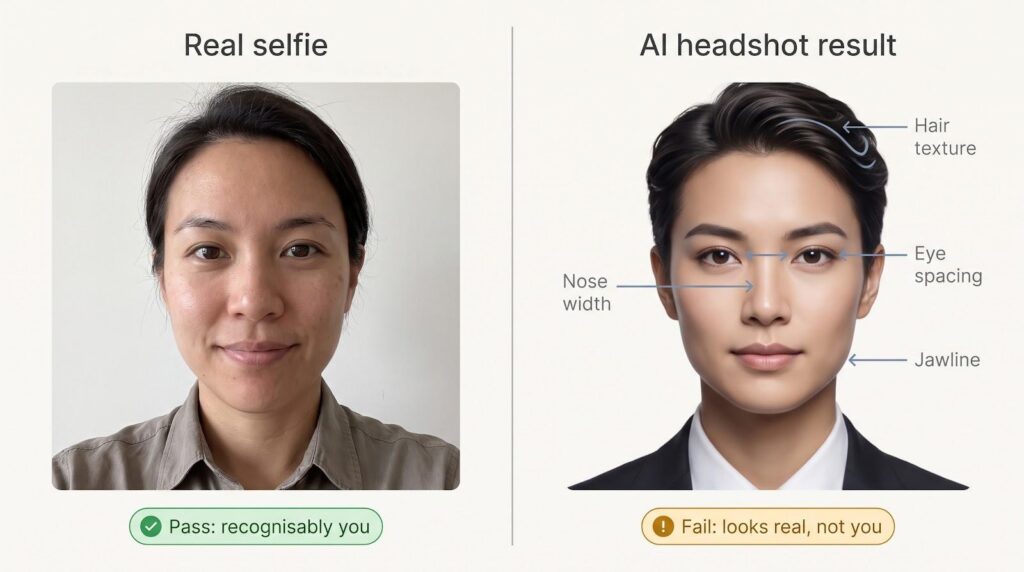
1. Does it look like you, or just look real?

Hold the AI image beside a recent selfie. Check nose width, eye spacing, hair texture, and age cues. If a close friend hesitates to tag you, reject it.
2. How many images will you actually publish?
Count only the photos you would post on LinkedIn, your website, or a press kit.
Effective cost per keeper = total price ÷ publishable images.
Lower dollars per keeper beat bigger batches every time.
3. Can the style repeat for new hires?
Ask whether the platform saves an exact preset (background hex, crop, lighting). Magic Studio and HeadshotPro store presets; BetterPic does so in its team dashboard.
4. Is the resolution fit for every channel?
Web bio or LinkedIn: 1,024 × 1,536 px is fine.
Conference banner: aim for 4K (≈ 3,840 × 5,760 px).
If in doubt, request a sample file and zoom to 100 %.
5. What happens to uploads and the face model?
Trace four items: uploads, personal model, generated files, and analytics thumbnails. Vendors should state deletion timelines for each. BetterPic and HeadshotPro promise 30-day wipes; Magic Studio advertises 90 days.
6. What’s the safety net?
Preview-before-pay (Magic Studio) = no upfront risk.
Free redo (HeadshotPro, Secta) = second try on the house.
Money-back guarantee (BetterPic) = seven days to ask.
Screenshot refund language before checkout; promotions can change terms.
7. Will it pass your legal or brand review?
Confirm that “commercial use” covers ads, press kits, and marketplaces. Hand the privacy policy to legal for GDPR or CCPA checks if you operate globally.
Rank your two non-negotiables—resolution, speed, privacy, or compliance—then shortlist the tools that clear both boxes. A clear winner usually emerges.
Does it look like you, or just look realistic?
Run the mirror test: place the AI headshot beside a current selfie and check nose width, eye spacing, jawline, hair texture, and visible age. If a close friend would pause before tagging you, reject the image, no matter how perfect the lighting or suit. A slightly imperfect but recognisable portrait builds more trust than a flawless stranger.
How many images will you end up publishing?
Skip the “up to 300 headshots” pitch. Open the folder and count only the shots you would post on LinkedIn, your website, or a press kit—most users keep just 3–10 % of the batch.

Effective cost per keeper = total price ÷ usable images
A $35 plan that yields 2 great photos ≈ $17.50 per keeper
A $59 plan that yields 8 keepers ≈ $7.38 per keeper
Track that number, not raw volume, and the best-value service becomes clear fast.
Can the style repeat when you add new hires?
A consistent staff page collapses the moment one headshot shows a different crop or background. Before buying, ask whether the platform can store an exact preset—background hex, lighting angle, framing—so every future employee matches the original set.
HeadshotPro locks crop and background to the pixel and stores the preset in its team dashboard.
Magic Studio saves a style you can reuse, but fine-grained crop control is looser.
BetterPic keeps approved looks in its dashboard for marketing sign-off.
If no tool guarantees a perfect match, budget for manual retouching or accept a mixed roster. Up-front consistency costs little and pays long-term brand dividends.
Is the resolution high enough for every channel you use?
Match pixels to purpose.
1,024 × 1,536 px looks sharp on LinkedIn, Slack, and most bios. At 300 dpi that is about 3.4 × 5.1 in—fine for badges, risky for stage banners.
BetterPic and HeadshotPro’s 4K tiers (≈ 3,840 × 5,760 px) scale to roughly 13 × 19 in at the same print density, leaving room for tight crops and posters.
Quick test: open the file at 100 % zoom. If it is larger than your monitor, you are safe for everyday marketing. If you have to zoom out to 50 %, designers will cheer.
What happens to your uploads and the face model after download?
Data retention hides in the fine print. Vendors often treat four assets differently:
Uploads – how long raw selfies stay on servers and backups
Personal model – when the face embedding is erased (and whether it trains future models)
Generated files – whether water-marked previews linger after purchase
Logs and analytics – small thumbnails kept for monitoring or bug fixes
Examples: Magic Studio deletes uploads and the personal model after 90 days, yet its privacy policy still references aggregated training data. BetterPic and HeadshotPro state 30-day wipes and “no AI training” language on both marketing and legal pages.
Ask each vendor to spell out timelines for all four assets in writing. If support cannot answer, consider that a red flag.
What is the remedy if the results disappoint?
Know the safety net before you pay:
Preview-before-pay — Magic Studio shows every image first; if none look right, simply close the tab.
Free redo — HeadshotPro and Secta grant at least one rerun when the first batch misses.
Money-back window — BetterPic offers seven days for a refund, but only after its human editors try a correction.
Conditional refunds — Some tools repay you only if zero images meet a published quality bar; “not my style” rarely qualifies.
Match the remedy to your deadline. Tight timelines rely on preview or redo promises; print projects benefit from human correction and a formal refund clause.
AI headshot use cases beyond LinkedIn
Startup founders
Investors flip through pitch decks quickly. A crisp headshot anchors your bio slide and later appears in press releases, podcast art, and speaker pages. Keep one formal crop for decks and a warmer version for social interviews.
Remote-team directories
A unified headshot style signals cohesion across time zones. HeadshotPro and BetterPic let you lock a background and crop so every new hire drops seamlessly into the grid.
Conference speakers and press kits
Event organizers judge the photo beside your session blurb. BetterPic offers 4K exports, and Magic Studio provides fast previews, helping you send square, vertical, and horizontal crops before the deadline.
Healthcare and professional listings
Patients choose providers long before an office visit. Accuracy beats glamour: neutral colors, natural skin tone, recognizable eyewear. Human-edit tools in BetterPic remove flyaways without plastic-skin artifacts.
E-commerce and marketplace sellers
A real face on Amazon or Etsy boosts credibility. Generate one neutral portrait, then resize for each platform’s image rules. Double-check ad policies; even with commercial rights, some sites restrict logos or text.
Agencies and consultants
Prospects decide in seconds if you appear trustworthy. Use Aragon AI to create a formal proposal shot, a casual webinar crop, and a vibrant LinkedIn banner while keeping the core likeness identical across channels.
Emerging trends and warnings for 2026
Generic models are closing the quality gap
Multimodal systems, such as Google’s Nano Banana Pro, can turn three reference selfies into a convincing portrait in seconds. They sometimes rival mid-tier headshot tools at near-zero cost. The trade-off: limited batch consistency, few style presets, no clear refund path, and minimal team controls.
Editing is now as critical as generation
Fine-grained editors—Aragon’s outfit and pose sliders, Magic Studio’s Magic Edit, Secta’s Remix—help turn near-misses into keepers and safeguard you when brand guidelines change.
Human retouching is back
The final 10 percent of polish—flyaway hair, subtle skin tone—often needs a human eye. BetterPic includes manual edits in every plan, reducing redo cycles and aligning images with print standards.
Static headshots are evolving into personal AI media
Platforms such as Photo AI reuse the same trained face for short videos, animated stickers, and presentation backgrounds. The reach can be valuable for marketing, but verify that your commercial-use clause covers motion content and that you are comfortable with any future remix.
Rights, privacy, and authenticity stakes rise with each new medium. Read the fine print before you approve video or GIF headshots.
All around, these AI headshot generator tools offer important professional touches to your images.
