



I verified the pros and cons of remote work using the Ministry of Health, Labour and Welfare’s guidelines and a table sorting a week’s worth of work.
What you will learn in this article
Pros and cons of remote work (for both employees and companies; a conclusion you can understand in 30 seconds)
The results of sorting a fictional week of work in Excel into ‘can be done from home’ and ‘requires going to the office,’ and how the perspective changed based on the sorting method
Countermeasures for common disadvantages as described in documents from the Ministry of Health, Labour and Welfare and the Ministry of Internal Affairs and Communications
If you are a manager thinking about how to handle team communication and consultations online, please also refer to our business chat comparison.
I will write about the verification method first. The pros and cons were verified by reading the Ministry of Health, Labour and Welfare’s ‘Guidelines for Promoting the Appropriate Introduction and Implementation of Telework’ and the Ministry of Internal Affairs and Communications’ telework security documents one by one (verification date: October 30, 2026). The sorting table and the disadvantage table were actually created by the editorial department in Excel. These are not the experiences of people who have continued remote work for a long time.
What are the pros and cons of remote work? A conclusion you can understand in 30 seconds
The advantages are reduced commuting burden, ease of concentration, and better compatibility with childcare and nursing care. The disadvantages are that the boundary between work and life becomes blurred, leading to long working hours, and that it is difficult to consult with others or grasp the situation.
Advantages for employees
Commuting time is reduced, easing the burden on mind and body
You can work in an environment where you can concentrate, making work more efficient
Easier to balance work with childcare or nursing care
Advantages for companies
Work efficiency increases, leading to improved productivity
Prevents turnover due to childcare or nursing care reasons
Can hire people who live far away
Can reduce office costs
Disadvantages (for both employees and companies)
The boundary between work and life becomes blurred, making long working hours more likely
It is difficult to talk to supervisors and colleagues, and changes in physical and mental health are less likely to be noticed
It is difficult to grasp working hours and work performance
There are concerns about the burden of communication costs, the home work environment, and information leaks
Many of the top search results also listed pros and cons separately for employees and companies. In this article, I have created a table to verify how these listed pros and cons apply to my own work.
Pros and cons written in the Ministry of Health, Labour and Welfare’s guidelines
Both pros and cons were written in the Ministry of Health, Labour and Welfare’s « Guidelines for the Promotion of Appropriate Introduction and Implementation of Telework. »Reading through them before deciding on a work style will make things go faster.
The beginning of the guidelines lists the benefits for workers as reduced commuting time, reduced physical and mental burden, improved efficiency through an environment where one can concentrate on work, and the ability to balance work with childcare and nursing care. The benefits for the company (employer) are also written as follows.
In addition, for employers, there are benefits such as contributing to improved productivity through operational efficiency, preventing employees from leaving their jobs due to reasons such as childcare or nursing care, securing excellent talent in remote areas, and reducing office costs.
The disadvantages appear in the chapter on labor management. Regarding long working hours, while the benefit of reducing overtime work is expected, it is written to be careful about the following risks.
Instructions and reports regarding work become easier to be made regardless of the time of day, the distinction between the worker’s work time and private time becomes ambiguous, and obstacles arise in securing the worker’s private time.
In addition, there are items regarding the difficulty of communicating with supervisors, etc., and the difficulty of noticing changes in physical and mental health (mental health), as well as cost burdens such as communication expenses, personnel evaluation, and security. Countermeasures for each disadvantage are summarized in a table in the heading below.
The difference between remote work and telework
The guidelines use the term « telework » to refer to working outside the company using information and communication technology. Depending on the work location, it is divided into three types: working from home, working at a satellite office other than the main office, and mobile work where you choose your location using a laptop or mobile phone. In this article, I will use the term « remote work » to match search terms and treat it as referring to the same work style.
I sorted a week’s worth of work into « can be done from home » and « requires going to the office »
When I listed and sorted 14 hypothetical tasks for a week, 7 tasks could be done from home and 7 required going to the office, making it exactly half and half.This is a hypothetical example assuming a person in charge of both general affairs and sales administration.
I made the table in Excel. The columns are No., Day of the week, Task, Judgment, and Reason for needing to go to the office. In the judgment column, I only entered either « can be done from home » or « requires going to the office, » and counted the number of each using COUNTIF at the bottom of the table. The « requires going to the office » cells are colored orange using conditional formatting.
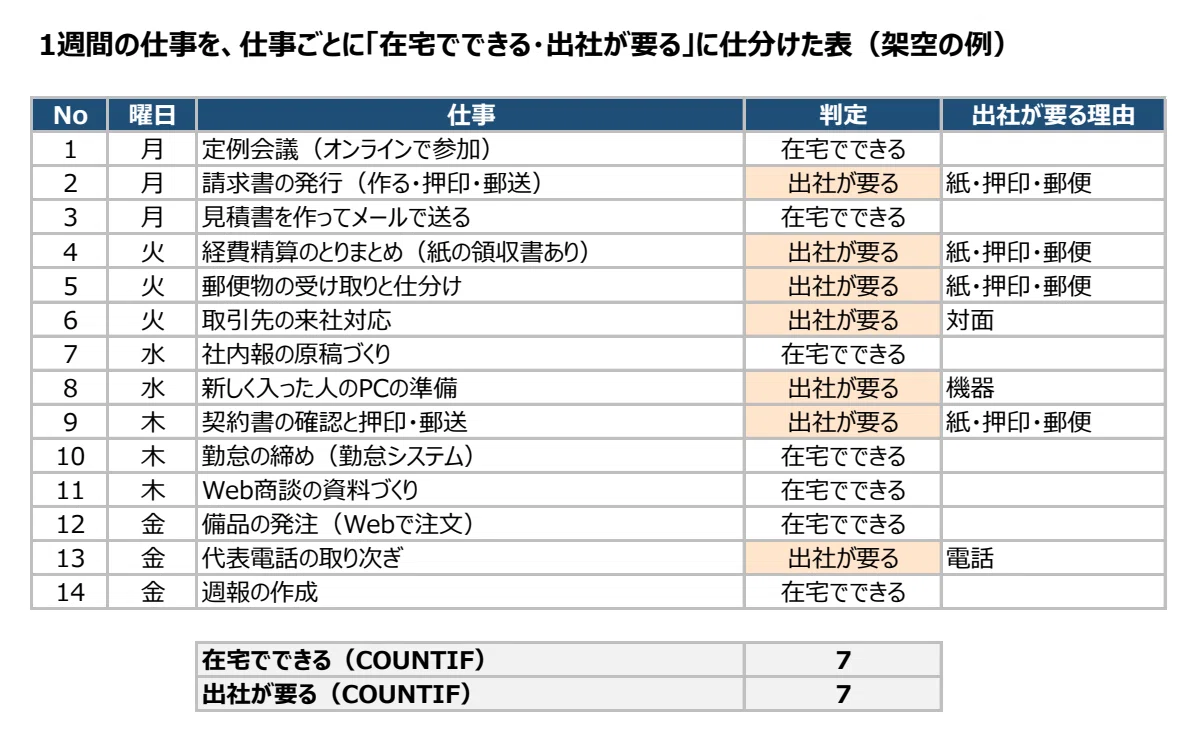
The reasons for the 7 tasks requiring office attendance are as follows.
Paper, stamping, and mail: 4 tasks (issuing invoices, compiling expense reports, receiving and sorting mail, checking and stamping/mailing contracts)
In-person: 1 task (handling visitors from business partners)
Equipment: 1 task (preparing PCs for new employees)
Phone: 1 task (handling main office calls)
Looking at this table alone, it seems like « half of the work cannot be done without being at the office. »
Where I stumbled: When sorted by task, it looked like many tasks required office attendance
When I broke the work down into processes and re-sorted it, 11 out of 18 processes could be done from home.What I found difficult to judge were tasks like issuing invoices, where only some parts of the work can only be done at the office.
When judged as a single task, the entire process, including creating the invoice, becomes « requires office attendance » just because of the stamping and mailing. So, I divided the 4 tasks of issuing invoices, expense reporting, PC preparation, and contracts into 2 processes each and recreated the table in the same format.
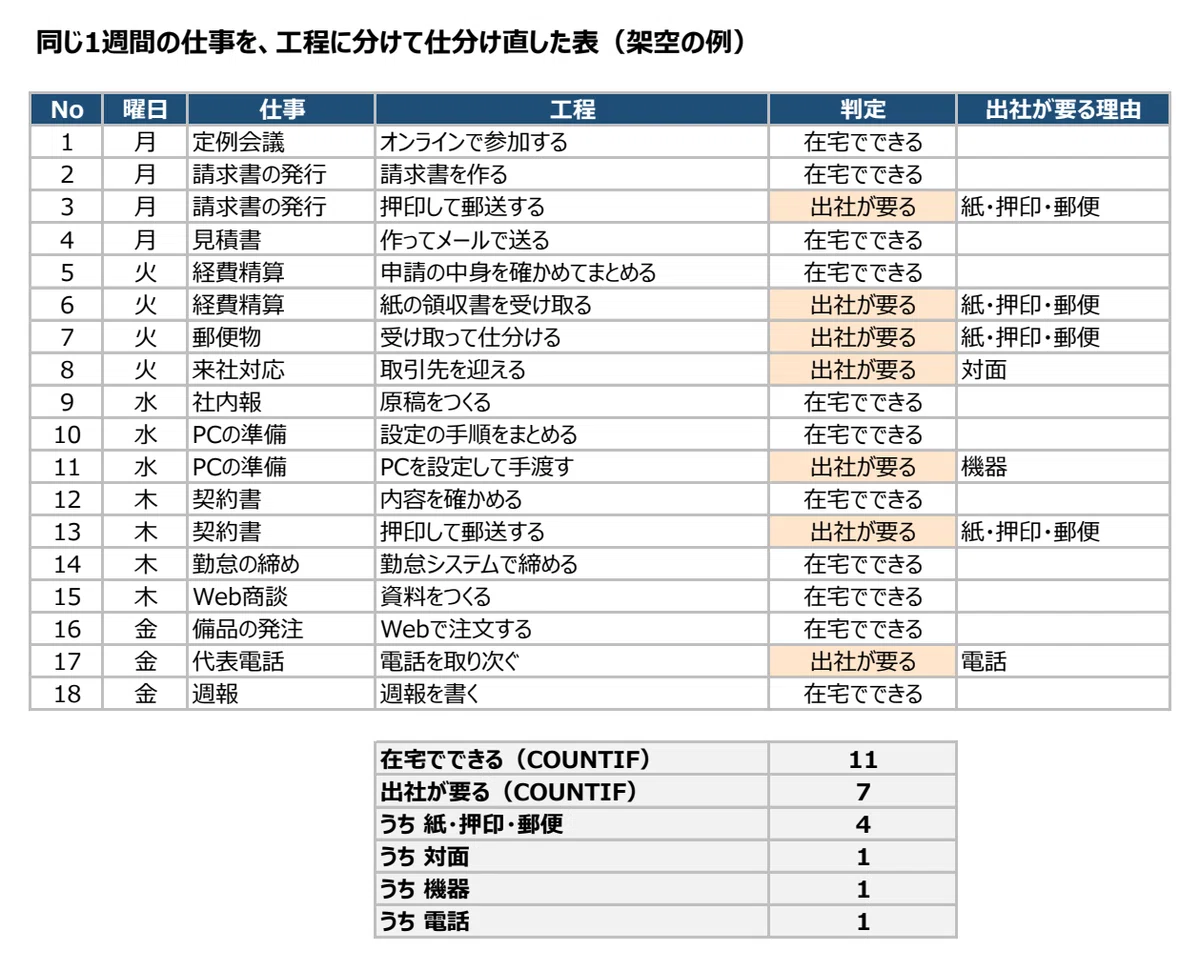
The number of processes requiring office attendance remains 7. Even so, I found that 4 of them—creating invoices, checking and compiling expense reports, summarizing PC setup procedures, and checking contract details—could be moved to remote work. For 4 out of the 7 that require office attendance, the reason is paper, stamping, and mail.
The guidelines also stated the same thing.
There are cases where work styles such as requiring unnecessary stamping or signatures, mandatory in-person meetings, or explaining materials to supervisors on paper act as barriers to the introduction and implementation of telework.
The guidelines continue by listing the abolition of unnecessary stamping and signatures, the paperless processing of documents, the digitization of approvals, and the introduction of online meetings as effective initiatives. When sorting your own work, judging by the unit of process rather than the task reveals which specific processes require office attendance. It also makes it easier to plan things like grouping paper, stamping, and mail processes on the days you go to the office.
I created a table of countermeasures written in official documents for each disadvantage
For all 9 commonly cited disadvantages, the thinking behind countermeasures was written in either the Ministry of Health, Labour and Welfare guidelines or Ministry of Internal Affairs and Communications documents.I compared the disadvantages frequently mentioned in top articles with the items in the guidelines and created a table in Excel.
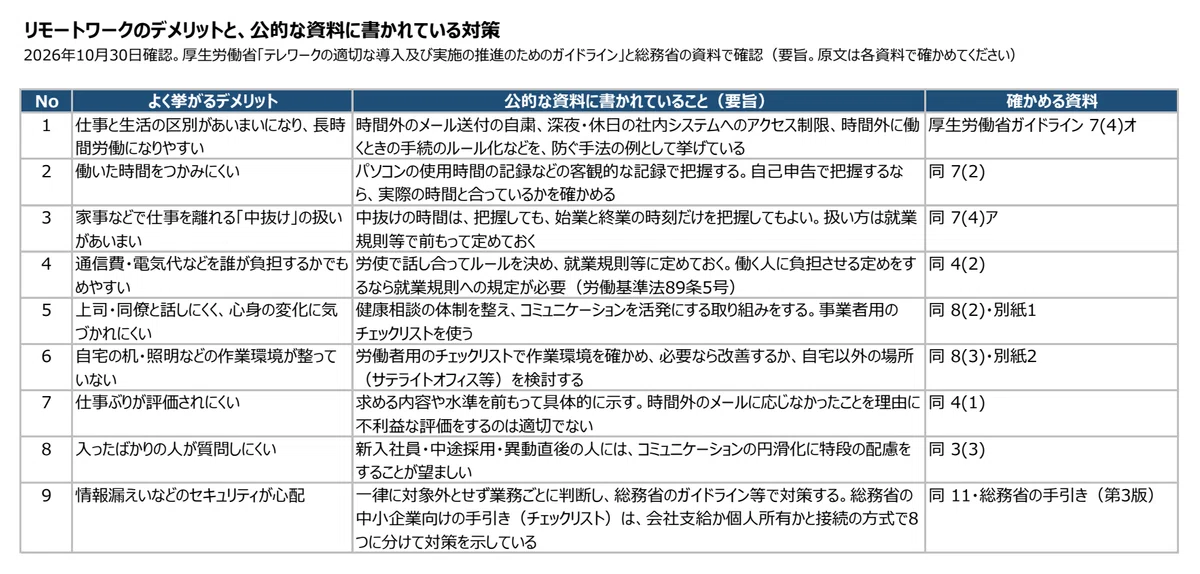
I will also write the contents of the table in sentences (this is a summary; please check the original documents for the full text).
The boundary between work and life becomes blurred, making long working hours more likely: Examples of preventive methods include refraining from sending emails outside of working hours, restricting access to internal systems during late-night hours and holidays, and establishing rules for procedures when working overtime (MHLW Guidelines 7(4)e).
It is difficult to track hours worked: Track them using objective records such as computer usage logs. If tracking via self-reporting, verify that it matches the actual time worked (Ibid. 7(2)).
The handling of ‘breaks’ (stepping away for chores, etc.) is ambiguous: You may track the break time, or you may simply track the start and end times of the workday. The method of handling this should be determined in advance in the rules of employment, etc. (Ibid. 7(4)a).
It is easy to have disputes over who bears the burden of communication and electricity costs: Discuss and set rules between labor and management, and stipulate them in the rules of employment, etc. If you decide to have the worker bear the cost, it must be stipulated in the rules of employment (Labor Standards Act Article 89, Item 5) (Ibid. 4(2)).
It is difficult to talk to supervisors and colleagues, and physical or mental changes are hard to notice: Establish a health consultation system and take initiatives to promote active communication. Use the checklist for employers (Ibid. 8(2) and Attachment 1).
The work environment, such as desks and lighting at home, is not set up properly: Check the work environment using the checklist for workers, and if necessary, improve it or consider a location other than home (such as a satellite office) (Ibid. 8(3) and Attachment 2).
Work performance is difficult to evaluate: Clearly state the required content and standards in advance. It is inappropriate to give a negative evaluation based on the fact that an employee did not respond to emails outside of working hours (Ibid. 4(1)).
New employees find it difficult to ask questions: It is desirable to give special consideration to facilitating communication for new graduates, mid-career hires, and those who have just transferred (Ibid. 3(3)).
Security concerns such as information leaks: Do not exclude it uniformly; judge by task and take measures according to the Ministry of Internal Affairs and Communications guidelines, etc. The Ministry of Internal Affairs and Communications’ guide for small and medium-sized enterprises (checklist) shows measures divided into eight categories based on whether the device is company-provided or personally owned and the connection method (Ibid. 11 and MIC Guide (3rd Edition)).
What I noticed while making the table is that four out of the nine (long working hours, hours worked, breaks, and cost burden) are prevented by ‘deciding on rules before starting.’ It can be read that starting without having decisions made leads to disadvantages more than the work style itself.
The checklists in Attachment 1 (for employers) and Attachment 2 (for workers) of the guidelines are also distributed in Excel format on the Ministry of Health, Labour and Welfare’s website. For security, if you first decide which method your company uses from the ‘Which is your telework method?’ section of the Ministry of Internal Affairs and Communications’ guide, you can narrow down the checklist items you need to look at.
Common questions: Pitfalls, comparison with commuting, and who is suited for it
The answer to every question changes depending on the content of the work and the person working. I will answer the questions that appeared in Google’s ‘People also ask’ section within the scope of the documents I checked.
What are the pitfalls of remote work?
It is starting without deciding on rules. The guidelines state that it is important for labor and management to discuss and decide in advance on the target tasks, application procedures, cost burden, methods of managing working hours, handling of break times, and communication methods during normal and emergency times. In the table I created this time, most of the disadvantages were prevented by having rules in place.
Which is better, remote work or commuting?
It cannot be decided uniformly. Even in this sorting, seven processes remained that required commuting after being divided into steps. The guidelines suggest that it is also possible for people who do not wish to work from home to use satellite office work or mobile work, and also ask that care be taken so that work is not biased only toward those who commute to the office. There is also a way of thinking that involves deciding the location for each process and combining days of commuting with days of working from home.
Why is working from home sometimes considered a bad idea?
The guidelines state that some people do not want to work from home because it makes it difficult to draw a line between their personal lives and their work. On the other hand, it also notes that even in industries and job types generally considered difficult, some individual tasks can be done remotely, and it is desirable to review how work is carried out rather than easily concluding that it is unsuitable for telework.
Who is suited for remote work?
The guidelines state that being able to work autonomously while paying attention to working hours and health is suitable for effective telework. Conversely, it notes that new employees, mid-career hires, and those who have just transferred may have many questions for their supervisors and colleagues and may feel significant anxiety. Rather than labeling people as suited or unsuited, it is a shorter path to first prepare a system that makes it easy to ask questions.
If you want to compensate for a lack of communication and consultation: Business chat
Among the disadvantages, the issue of « it being difficult to talk or ask questions » can be partially compensated for by equipping yourself with communication tools.The guidelines also mention the introduction of software that allows for communication similar to that in the workplace as an initiative for smooth communication.
One example is « Chatwork »(kubell Co., Ltd.). According to the official feature introduction, you can create group chats with internal and external users by project or department, and talk while seeing faces via video or voice calls. During a call, you can also share your computer screen with the other party. You can also create tasks and assign work to others.
The Ministry of Internal Affairs and Communications’ handbook for small and medium-sized enterprises includes « Configuration Explanation Material (Chatwork) » as related material, which summarizes procedures such as setting up two-factor authentication and restricting members (the Ministry of Internal Affairs and Communications notes that the configuration explanation material does not recommend the use of any specific product).
As a point of caution for introduction, the Business Concierge product page states that switching from a free plan to a paid plan applies to all users in the organization, that the free plan has limitations on storage capacity and management functions, and that an enterprise contract is required if you want higher security and more thorough support. Please check the differences in fees and plans in the materials or on the official website.
If you want to compare other chat tools, Business Concierge’s « 7 Recommended Chat Systems | Explaining How to Choose and Points to Note When Introducing » organizes how to choose and points to note when introducing them.
Summary: Things to do before starting remote work
Check the pros and cons for both employees and the company using the Ministry of Health, Labour and Welfare’s guidelines
Write down your own week of work and sort them into « can be done from home » or « requires going to the office » by process unit, not by job
Count the reasons for processes that require going to the office (paper, stamping, mail, face-to-face, equipment, phone) and think about whether any can be reviewed
Decide on rules for long working hours, leaving the desk, cost burden, and communication methods before starting
Check the work environment and security using the checklists from the Ministry of Health, Labour and Welfare and the Ministry of Internal Affairs and Communications
If you are concerned about a lack of communication and consultation, compare business chat tools using the materials
Reference materials (Confirmation date: October 30, 2026)
From the editorial department that wrote this article
We are the editorial department for Business Concierge powered by Onamae.com. In this note, we will organize the tools used for work arrangements in an easy-to-understand way, while creating tables and verifying them with official documents.
If you would like to review your communication and consultation systems for remote work, you can check the business chat features and materials introduced in this article on this page.
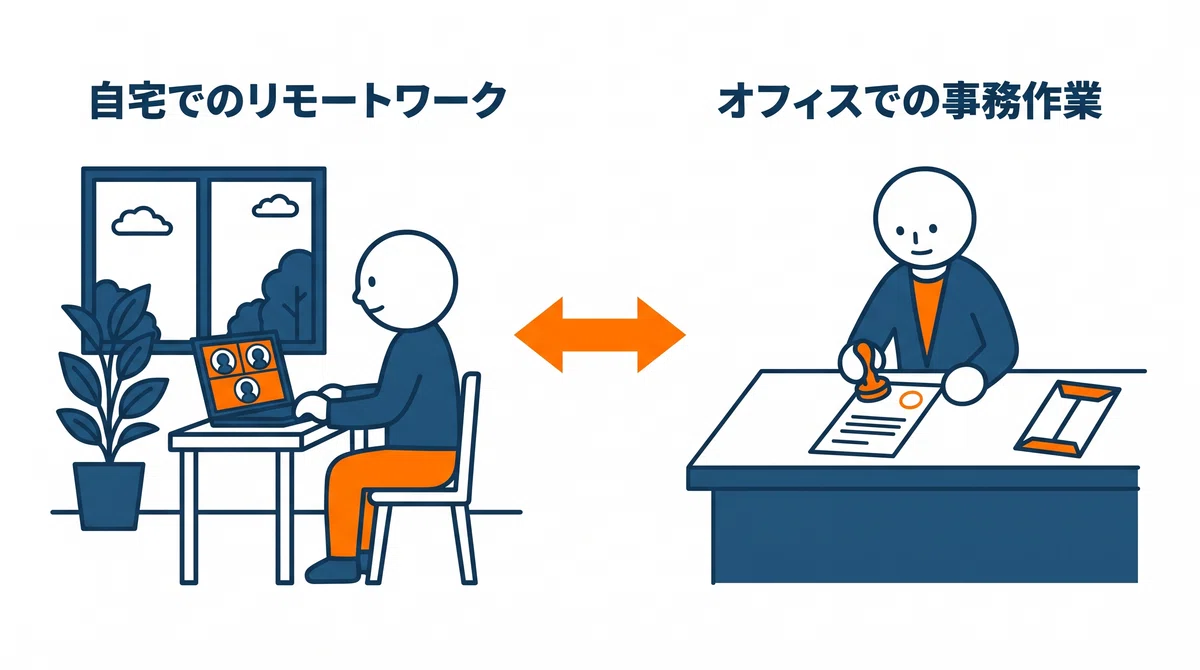
*The illustrations in this article are images created with generative AI. The Excel table images are captures of tables created by the editorial department (the sorting table is a fictional example, and the disadvantage table is a summary of results verified using documents from the Ministry of Health, Labour and Welfare and the Ministry of Internal Affairs and Communications).
