


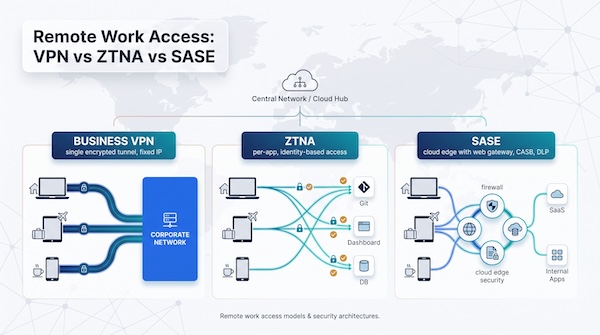
GUEST OPINION: Remote work turns every home router—and every airport hotspot—into a security risk. Before you choose a tool, remember the core differences: a traditional VPN encrypts all traffic, ZTNA opens only the apps you authorise, and SASE combines both under a single cloud-based security stack. This guide ranks the top VPN services for remote work in 2026, matching seven platforms to the jobs they do best—from locked-down static IPs to full edge protection—so you can pick the architecture that meets your team’s size, budget, and compliance demands.
The seven VPN services at a glance
Use this grid as your quick shortlist. Each row pairs a service with its ideal use case, architecture, and four buying cues. The order tracks real-world needs, starting with fixed egress IPs and ending with full stack SASE, so you link problems to products instead of popularity.
*Prices are public snapshots and will be re-checked before publication.
Option = feature exists on certain tiers or as an add-on. N/A = capability falls outside the product’s design.
Keep reading for the scorecard we use to rate security, admin controls, performance, compliance, and price. It will help you weigh each factor against your own priorities.
How we evaluated business VPNs
Our 100-point scorecard follows the real rollout path: secure the tunnel, manage identities, keep people productive, fit the network, satisfy auditors, and stay on budget. The percentages below show how many points each pillar can earn.
Security and access architecture – 22%
Must-have: MFA for admins and users, modern protocols (WireGuard, IKEv2, TLS 1.3), kill-switch integrity, and traffic segmentation that keeps contractors away from payroll.
Nice-to-have: AI safeguards, post-quantum encryption, and sovereign controls. Gartner’s 2026 SASE report calls these the new differentiators, not encryption itself. Top tier (5/5) means every control above is documented and enforced; miss MFA or let logs stale and the score drops fast.
Identity and administration – 18%
Full marks require SAML or OIDC SSO, SCIM-driven lifecycle automation, role-based policies, real-time audit logs, and an open API for bulk changes. Dump every user in one bucket—or hide SCIM behind an enterprise paywall—and points disappear.
Performance and reliability – 15%
Raw speed matters, but stability matters more. We measure:
Median and 95th-percentile throughput on a local, cross-country, and U.S.–EU hop
Added latency, jitter, packet loss, and auto-reconnect time after Wi-Fi drops Vendors need at least 85% bandwidth retention, and sub-2-second reconnects to earn a five.
Deployment and usability – 13%
We time the path from welcome email to the first “Connected” badge. Extra credit for zero-touch MDM installs, parity across Windows, macOS, Linux, iOS, Android, ChromeOS, and a browser option for contractors. Silent auto-updates help, but admins need a pause button so the CFO’s laptop stays stable during meetings.
Network and routing fit – 10%
Fixed egress IPs, split tunnelling, site-to-site links, and per-app routing all count. Products that make you open a ticket for a second static IP—or that can’t keep Zoom outside the tunnel—lose ground.
Compliance evidence and transparency – 10%
We ask for signed BAAs/DPAs, SOC 2 or ISO 27001 that match the tier you plan to buy, selectable log regions, and a public CVE feed updated within days. Gartner forecasts that by 2028, half of all firms will adopt zero-trust data governance to meet rising compliance demands and filter unverified AI output.
Pricing and scalability – 12%
We price every service at 5, 25, and 100 seats, then layer on static-IP, gateway, and support fees. Clear renewal terms and month-to-month flexibility score higher than teaser rates that jump 40% in year two.
TorGuard Business: best for dedicated IP bundles and SaaS allowlists
Need one steady IP so Microsoft 365 or QuickBooks quits flagging sign-ins? TorGuard Business includes at least one fixed public address in every plan, giving IT a dependable target for Conditional Access and IP allowlists.
The published $44.99-per-month starter bundle covers five users and one dedicated IP. Every tier is HIPAA compliant and includes an account manager plus access to more than 3,000 servers in 50+ countries, features outlined on https://torguard.net/business-vpn/. Check that page before you buy because TorGuard refreshes bundle sizes and dedicated-IP counts several times a year.
Setup is quick. Import a CSV of users, assign IPs per seat, and enable the portal’s two-factor authentication. Clients run OpenVPN, WireGuard, and IKEv2 on Windows, macOS, Linux, iOS, and Android, so staff connect with a familiar interface.
Limits to note: the public docs list no native SAML, no SCIM, no device-posture checks, and no stated log-retention period. If you need per-app controls or SIEM exports, choose a ZTNA platform instead. Pick TorGuard when a reliable static IP is the only box you need to tick, nothing more.
NordLayer: best all-round managed VPN for growing SMBs
Why it stands out
NordLayer blends a familiar NordVPN interface with business controls: SAML or OIDC SSO, SCIM automation, device-posture checks, and private gateways that keep finance traffic separate from engineering.
Pricing snapshot
Lite: $8 per user per month, billed annually, five-user minimum
Core: $11, Premium: $14; both add $40 per month for a server with a dedicated IP
Enterprise: starts at $6 per user for 200-seat deals
Deployment experience
Connect Entra ID, Okta, or Google Workspace, map groups, and users sync automatically. Posture checks block outdated OS versions, and most teams record first connection within an hour.
Performance
Early lab runs and third-party tests show NordLynx keeps about 85 percent of baseline bandwidth with minimal latency spikes, good enough for real-time calls. We will publish full numbers after retesting.
Watch the extras
Dedicated IPs, extra gateways, and longer log retention sit behind higher tiers or add-ons, so size your plan, then add forty dollars for each dedicated exit you need.
For remote businesses that want centralised control without the weight of a full SASE suite, NordLayer still lands in the sweet spot.
Twingate: best for application-level access without a traditional VPN
What it is
Twingate delivers Zero Trust Network Access. Instead of dropping users onto a flat LAN, the client opens a tunnel only to the resource you tag—git.internal, a finance dashboard, or a single database port. Everything else stays invisible, shrinking lateral-movement risk.
How it works
Deploy a lightweight Connector in the VPC or on-prem subnet that hosts your service, label the resource in the console, and map it to an Okta, Entra ID, or Google Workspace group. The client builds a direct, encrypted path to that resource, skipping hairpin backhaul through headquarters.
When it shines
Ideal for contractors and BYOD. Grant a freelancer two-week access to one hostname, mark the laptop as unmanaged, and let the policy expire automatically—no certificates to chase later.
Where it falls short
If you need a single outbound IP for SaaS allowlists or full traffic inspection, look elsewhere. Twingate routes only to tagged private resources; internet traffic exits locally. Broadcast-heavy legacy apps may also need redesign.
Pricing snapshot
Starter: free for up to five users
Teams: $5 per user per month (annual billing discounted 15 percent) up to 100 users
Business and Enterprise add SCIM, device-posture checks, longer log retention, and SIEM exports—budget closer to $10+ per user
Choose Twingate when identity-driven, per-app access matters more than a fixed public IP or an “office in a tunnel” VPN.
Cloudflare Access: best for global edge access and Cloudflare users
Already use Cloudflare for DNS, CDN, or DDoS defence? Cloudflare Access sits in the same dashboard and turns each of Cloudflare’s 310-plus edge data centres into a Zero Trust gate. Staff reach private apps through the nearest PoP instead of hairpin traffic through a single VPN appliance, keeping latency low from Detroit to Dubai.
Setup mirrors Cloudflare’s rule builder. Pick an identity provider (Entra ID, Okta, Google Workspace), enter the application hostname, then layer on device-posture or geo checks. Because policies run at the edge, risky sessions end before they reach your origin.
Pricing snapshot
Free for up to 50 users (Access + Gateway Core)
Pay-as-you-go at $7 per user per month beyond 50, or bundle Access, Secure Web Gateway, CASB, and DLP under an annual contract
Reserved egress IPs start at $5 per site per month. Add this if auditors need a fixed address
Who it suits
Global teams that already manage Cloudflare zones and want one policy fabric for DNS, web, and private-app access.
Watch outs
Plan on an afternoon of wiring: mapping apps, testing posture checks, and exporting logs to a SIEM. Small teams looking for a one-click VPN may find the menu dense.
When your goal is uniform, edge-delivered policy enforcement and you are already inside the Cloudflare ecosystem, Access scales cleanly.
Check Point Harmony SASE: best for advanced security and multiple locations
From Perimeter 81 to Harmony
Check Point folded the Perimeter 81 stack into Harmony SASE, then added Firewall-as-a-Service, cloud DLP, and remote browser isolation. The result links branch offices, cloud VPCs, and roaming users under one policy engine.
What you deploy
Sync identities from Entra ID, Okta, Google Workspace, or LDAP.
Segment networks, place a cloud firewall in front of web traffic, and set posture rules that block unpatched laptops.
Offer contractors an agentless, isolated browser session—useful for unmanaged Chromebooks.
Visibility and logs
Real-time dashboards surface threats and policy hits, while built-in connectors ship logs to Splunk or Microsoft Sentinel without extra code.
Pricing snapshot (public pages, August 2026)
Essentials (five-user minimum): $10 per user per month, $40 per private gateway
Premium adds 100 FWaaS policies and longer log retention; Premium Plus raises limits again
Enterprise (50-user minimum) moves to custom quotes and usage-based options
Budget for reserved static IPs and extended log archives; both add to monthly spend.
Fit
Too much for a five-person startup that only needs a static IP, but a strong match for a growing firm with multiple sites, hybrid cloud, and compliance audits. If you already run Check Point firewalls, license bundles shorten the learning curve. Plan a careful pilot because broad capability brings a longer setup checklist.
OpenVPN CloudConnexa: best for IT teams wanting deployment flexibility
Why admins like it
CloudConnexa brings OpenVPN’s trusted protocol to a cloud console. Spin up an Internet Gateway to secure public traffic, drop Connectors into VPCs for private-app access, or link branch offices with site-to-site tunnels. Mix and match as the network grows.
Admin experience
Create groups, connect SAML or OIDC SSO, and set split-tunnel or per-app routes. A built-in audit log records every change and forwards to your SIEM without extra code.
Advertisement
Pricing snapshot
$7 per active connection per month (first three included in the starter bundle)
Reserved egress IP: $5–$12 monthly, depending on region
No seat minimum, but a five-connection base plan applies (Prices from OpenVPN public portal, August 2026.)
The connection-based model lets bursty teams scale down after a project, though finance must plan for the variable line item.
What to watch
You manage topology and DNS design. If you want a “next, next, done” wizard, look elsewhere. For IT-led SMBs who already trust .ovpn files and need cloud elasticity, CloudConnexa hits the sweet spot.
Cisco Secure Client: best for established Cisco environments
Cisco kept AnyConnect alive by rebranding and expanding it as Secure Client, then tying it into the broader Secure Access platform. If your firewalls, SD-WAN, or ISE deployments already wear a Cisco badge, staying native keeps policy, logging, and support under one roof.
License tiers (Cisco Ordering Guide, February 2026)
VPN-Only – IPSec/SSL tunnels; licensed per headend ASA/FTD
Advantage – Adds device posture and SAML/OIDC SSO; pooled across sites; 1/3/5-year term
Premier – Adds DNS-layer security and remote browser isolation
Pricing is reseller-driven, but published MSRP starts around $3.00 per user per month for VPN-Only and $4–$6 for Advantage on a three-year term. Premier lands higher. Enterprise agreements often fold seats into existing budgets.
Advertisement
Where it runs
Windows, macOS, Linux, iOS, Android, and ARM Chromebooks. Off-VPN modules keep DNS and web filtering active when the tunnel drops.
Architecture cautions
You still need a headend (ASA, FTD, Meraki MX, or Cisco’s cloud Secure Access) to get fixed egress IPs. Certificates, Smart Accounts, and license tokens add overhead that can burden lean IT teams.
Choose Secure Client when your organisation already relies on Cisco gear and you want one agent, one console, and one support contract. It is less suited to teams starting from scratch.
Business VPN vs ZTNA vs SASE: which model fits your team?
Picture the three architectures as concentric circles around remote access, each adding controls as you move outward.

Business VPN
A single encrypted tunnel and a predictable public IP, ideal when roaming staff need SaaS allowlists or legacy apps expect a flat network.
Zero Trust Network Access (ZTNA)
Grants per-app access only after identity, device health, and location checks pass. Perfect for contractors or BYOD users who just need the ticketing system, not the whole subnet.
Secure Access Service Edge (SASE)
A cloud security suite that layers web gateway, firewall, CASB, and DLP on a global edge. Gartner’s 2026 SSE report notes that core features are now commodity; vendors compete on AI policy engines and data-sovereignty controls.
Decision grid
Need a static IP and basic encryption? Pick a managed VPN (TorGuard, NordLayer).
Need per-app access without network sprawl? Choose ZTNA (Twingate, Cloudflare Access).
Need one policy fabric for branches, cloud VPCs, and roaming staff? Go SASE (Check Point Harmony).
How to choose by remote-work scenario

1. Safe public Wi-Fi on the road
Sales reps need a quick shield, not a network overhaul. NordLayer Lite auto-connects on untrusted Wi-Fi, enforces a kill switch, and adds a cloud firewall for $8 per user with a five-seat minimum.
2. SaaS allowlists need a fixed IP
When Microsoft 365 or QuickBooks flags unknown addresses, TorGuard Business solves the problem: every $44.99 five-user bundle includes a dedicated IP you can whitelist once and forget.
3. Broad access to internal apps
If designers still pull files from an on-prem NAS, spin up a private gateway. NordLayer Core or OpenVPN CloudConnexa routes only the needed subnets, letting Netflix stay outside the tunnel.
4. Contractors need one hostname, nothing more
Pick ZTNA. Twingate Teams ($5 per user) or Cloudflare Access (free for up to 50 users) grants time-boxed, per-app access and expires automatically when the invoice clears.
5. Many offices plus cloud VPCs
Hybrid sprawl calls for consolidation. Check Point Harmony SASE drops lightweight edges in each site and enforces a single policy set. Plan a pilot first; gateways run about $40 each on most tiers.
6. We already run Cisco gear
Stay native. Cisco Secure Client Advantage adds posture checks and reuses your ASA or FTD headend. Seats often fold into existing enterprise agreements, but paperwork starts early.
The hidden costs of a business VPN
Sticker prices rarely match the first invoice. Vendors add fees that push a $6 headline to $12 before tax.

Run the math before you sign: model 5, 25, and 100 users, include every gateway, IP, and support tier you will need for the next 18 months, then lock those numbers into the contract. A quick spreadsheet today prevents a budget fire drill later.
Security and compliance procurement checklist
Ask every shortlisted vendor for the same evidence, and then keep it on file for your CISO and auditors.

Deployment checklist for a distributed team
1. Before rollout
List every app and subnet; tag each for full tunnel, split tunnel, or ZTNA.
Map employees, contractors, and admins to least-privilege policies.
Document exception and emergency-access steps.
2. Pilot (1 week, 5 mixed users)
Clock each action: invite → first connect, reconnect after sleep, Wi-Fi→LTE hand-off.
Break things on purpose: drop Wi-Fi mid-call, disable the user in the IdP, close the lid.
Record every help-desk ticket and survey pilot users after five days.
3. Production rollout
Turn lessons into a Workast board: MDM push, group mapping, user comms, legacy VPN sunset.
Deploy in waves and pause if ticket volume spikes.
Send a one-page quick-start guide (screenshot, MFA reset link, help-desk Slack).
Retire the old VPN when usage falls below 5 percent.

Workast board view for managing remote-access deployment checklist
4. Off-boarding workflow
HR ticket triggers: disable IdP account → kill VPN or ZTNA session → revoke device certs.
Rotate shared secrets and reassign static IPs.
Close every task on the checklist and keep an audit trail.
Alternatives that may beat buying yet another VPN
Not every team needs a managed service. Three DIY routes can cut fees, but each shifts more work onto you.
1. Self-hosted WireGuard
Spin up a lightweight VM, script key rotation, and expose one port through Cloudflare Tunnels or an AWS Elastic IP. You pay only the cloud instance (≈$6 per month for a t4g.micro) and your own sleep, because patches and monitoring are on you.
2. Mesh overlays (Tailscale, NetBird)
Devices authenticate through your IdP and form a peer-to-peer mesh. Great for dev labs; the paid Tailscale Premium tier runs $18 per user. Auditors who need forced egress or full traffic logs may steer you back to a managed VPN.
3. Pre-configured travel router
For hardware that can’t run a client, flash an OpenWrt device ($70) with your VPN profile; anything behind it inherits the tunnel. Test DNS and IPv6 leaks, and plan for manual firmware updates.
DIY saves cash or adds flexibility, but it also puts security and uptime back on your plate. Budget staff hours before you declare, “We’ll just run WireGuard.”
Frequently asked questions
What’s the best VPN for a small remote team?
Match the tool to your tightest constraint. Need a fixed IP? TorGuard Business starts at $44.99 for five users. Need one-click deployment and per-seat billing? NordLayer Lite is $8 per user with a five-seat minimum. Pilot both for a week before deciding.
Is ZTNA more secure than a traditional VPN?
It’s narrower, not automatically stronger. ZTNA limits access to named apps, so a phished password can’t see your whole network. But if your IdP or posture check fails, the attacker still gets in. Layers beat labels.
Will a VPN slow down Zoom or Teams calls?
Only if you backhaul traffic through a distant gateway. Split-tunnel rules in NordLayer, CloudConnexa, and Harmony SASE keep media on the local pipe, adding less than 30 ms in most tests. Always verify with a real call.
Does a business VPN make us HIPAA or GDPR compliant?
No. Encryption in transit is one checkbox. You still need a signed BAA or DPA, audited access logs, breach-notification terms, and region-locked storage.
Can contractors share an employee’s VPN account?
Never. Shared credentials kill accountability. Give each contractor a unique identity and a time-boxed ZTNA policy in Twingate or Cloudflare Access.
Is Perimeter 81 still available?
Yes, but it’s now Check Point Harmony SASE with the same features plus new pricing and support channels.
What’s the difference between Cisco AnyConnect and Secure Client?
Secure Client is the next-gen agent. It keeps AnyConnect’s VPN modules and adds device posture, DNS security, and simpler Smart Licensing. Existing profiles migrate automatically.
Do we still need a VPN if every site uses HTTPS?
HTTPS encrypts browser traffic but can’t give you a fixed IP, enforce DNS filtering, or hide internal services. VPN or ZTNA adds those controls.
Should we self-host WireGuard to save money?
Only if you have staff for patching, key rotation, and monitoring. A $6 per month VM is cheap, but 24/7 operations time is not.
How often should we review our remote-access setup?
At least quarterly. Vendors ship new features fast, and license creep is real. Block 30 minutes on the calendar every three months.
